HubSpot CRM Implementation Partner for SaaS: What to Look For Before You Hire
Updated July 2026 · Reviewed by the Leadle RevOps team
TL;DR — HubSpot is easy to start with, but hard to run well for revenue. A HubSpot CRM implementation partner sets up the CRM around how a B2B SaaS team actually sells: architecture, lifecycle stages, lead status, pipelines, source tracking, workflows, dashboards, and adoption. Choose a partner who designs the revenue process before configuring the tool. Leadle is a HubSpot Solutions Partner focused on CRM implementation, RevOps, and GTM execution for B2B SaaS and tech companies.
What is a HubSpot CRM implementation partner?
A HubSpot CRM implementation partner is a HubSpot-certified agency or consultancy that configures HubSpot around a company’s revenue process — including CRM architecture, lifecycle stages, pipelines, workflow automation, dashboards, integrations, data cleanup, and team training — so that sales, marketing, RevOps, and leadership can rely on the CRM as a system of record.
HubSpot is easy to start with. But getting HubSpot to work properly for sales, marketing, RevOps, and leadership is a different problem.
Most CRM issues are not tool issues. They are process issues.
Bad data. Loose lifecycle stages. Messy pipelines. No ownership. Broken source tracking. Dashboards no one trusts. Workflows that were built once and never touched again.
That is why choosing the right HubSpot CRM implementation partner matters. A good partner does not just “set up HubSpot.” They help you build a CRM your revenue team actually uses.
Leadle is a HubSpot Solutions Partner focused on CRM implementation, RevOps, and GTM execution for B2B SaaS and tech companies.
About the HubSpot Solutions Partner Program
The HubSpot Solutions Partner Program is HubSpot’s ecosystem for agencies, consultancies, and service providers that help companies with marketing, sales, sales enablement, CRM implementation, revenue operations, AI strategy, and AI transformation.
So the job of a Solutions Partner is not only technical setup. The real job is making HubSpot useful for the revenue team.
Why SaaS companies need more than basic HubSpot setup
For SaaS teams, HubSpot usually needs to support more than one simple sales pipeline.
You may have:
- Inbound leads
- Outbound leads
- Demo requests
- Free trial or freemium users
- Partner-sourced leads
- Expansion opportunities
- Renewals
- Customer success handoffs
- Founder-led sales
- SDR to AE handoffs
- Marketing attribution
- Board-level revenue reporting
If the CRM is not designed properly, everything starts looking messy. The team may still use HubSpot every day, but leadership cannot trust the reports.
That is the real problem.
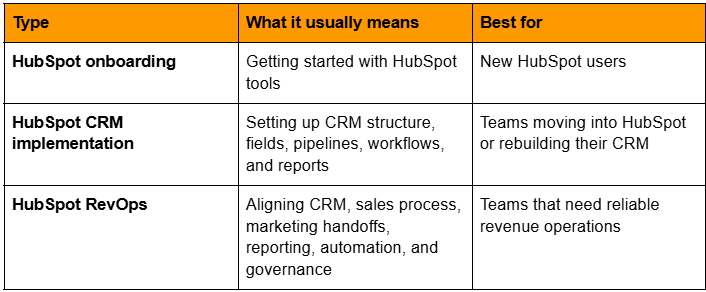
HubSpot onboarding vs HubSpot CRM implementation vs HubSpot RevOps
These terms are used together, but they are not the same.
When should you hire a HubSpot CRM implementation partner?
You should consider bringing in a partner when:
- HubSpot is being used only as a contact database
- Your sales team does not update deals consistently
- Lifecycle stages are unclear
- Lead status and lifecycle stage are being mixed up
- Marketing and sales disagree on lead numbers
- Source tracking is unreliable
- Reports do not match reality
- Workflows are confusing or outdated
- SDRs and AEs have unclear handoffs
- Customer success is not connected to sales data
- Leadership still depends on spreadsheets
The earlier you fix this, the easier it is to scale. If the CRM foundation is weak, every automation built on top of it becomes weaker.
What a good HubSpot CRM implementation should include
A proper HubSpot implementation should cover the full revenue process, not just fields and workflows.
1. CRM audit
Before building anything, the partner should understand what already exists.
That means reviewing:
- Current objects
- Properties
- Pipelines
- Lifecycle stages
- Lead sources
- Forms
- Lists
- Workflows
- Dashboards
- Integrations
- Data quality
This is where most hidden issues show up.
2. CRM architecture
This is the foundation. The partner should define how contacts, companies, deals, activities, and custom objects are used. They should also decide what data belongs where.
A common mistake is adding too many custom fields without a clear reason. The CRM should be simple enough for the team to use and structured enough for leadership to trust.
3. Lifecycle stage design
Lifecycle stages show where a person or company is in the buyer journey. HubSpot ships with eight default lifecycle stages: Subscriber, Lead, Marketing Qualified Lead (MQL), Sales Qualified Lead (SQL), Opportunity, Customer, Evangelist, and Other.
For B2B SaaS teams, these defaults usually need to be extended with custom stages to reflect subscription revenue and post-sale motion. Common custom additions include:
- Expansion opportunity — existing customers with a live expansion or upsell motion
- Churned customer — customers who have cancelled but should still be tracked for win-back or reporting
Whether you keep HubSpot’s defaults, edit them, or add custom stages, every stage needs a clear entry rule. No guesswork.
4. Lead status setup
Lead status is a separate default HubSpot property, not the same as lifecycle stage. Lifecycle stage shows funnel position. Lead status shows what sales is currently doing with the lead.
Examples of lead status values:
- New
- Working
- Attempted to contact
- Connected
- Open deal
- Unqualified
- Nurture
- Recycled
This helps sales teams work leads without breaking lifecycle reporting.
5. Pipeline setup
Your deal pipeline should reflect the way your team actually sells.
That includes:
- Deal stages
- Stage entry criteria
- Required fields
- Deal owners
- Forecast categories
- Lost reasons
- Deal aging rules
- Renewal or expansion pipeline, if needed
If the pipeline is vague, forecasting becomes vague too.
6. Source tracking
Lead source tracking is one of the most important parts of HubSpot setup. You should know where pipeline is coming from, not just where leads are coming from.
HubSpot provides two default source properties: Original Source (how a contact first found you) and Latest Source (how they most recently came back), each with drill-down 1 and drill-down 2 sub-properties. Those defaults cover the standard values — organic search, paid search, paid social, email marketing, offline sources, direct traffic, referrals, and others.
For B2B SaaS reporting, most teams also add custom source properties to break out attribution more precisely. Common examples:
- Campaign source (custom)
- Outbound source (custom)
- Partner source (custom)
- Paid source (custom, for platform-level breakout)
- Event source (custom)
- Referral source (custom)
Without a mix of the defaults plus a few custom source properties, marketing and sales reporting becomes noisy.
7. Workflow automation
Workflows should save time. They should not create confusion.
Good workflow automation may include:
- Lead assignment
- Lifecycle stage updates
- SDR task creation
- Demo request routing
- Internal alerts
- Follow-up reminders
- Deal stage automation
- Renewal reminders
- Data cleanup rules
Every workflow should have an owner. If no one owns it, it will eventually break.
8. Dashboards and reporting
Dashboards should answer real business questions. For SaaS teams, that usually means:
- How much pipeline was created?
- Where did it come from?
- Which sources convert?
- Which reps are moving deals?
- Where are deals getting stuck?
- What is the sales cycle?
- What is the forecast?
- Which campaigns influenced revenue?
- Which segments are working?
A dashboard that looks good but does not help decision-making is not useful.
9. Integrations
HubSpot usually does not work alone. A SaaS team may need HubSpot connected to:
- Website forms
- Calendar tools
- Calling tools
- LinkedIn outreach tools
- Email sequencing tools
- Enrichment tools
- Ad platforms
- Customer success tools
- Finance tools
- Data warehouses
The goal is not to connect every tool. The goal is to make sure the right data reaches the right place.
10. Data cleanup
Bad CRM data slows everyone down. A good implementation should include cleanup for:
- Duplicate contacts
- Duplicate companies
- Missing owners
- Broken source fields
- Outdated lifecycle stages
- Empty required fields
- Wrong company associations
- Junk leads
- Invalid domains
- Inconsistent naming
Clean data is not a one-time task. The implementation should also include rules to keep the data clean later.
11. Team training and adoption
A CRM only works if the team uses it. Training should be role-specific.
- Sales should know how to work leads and deals
- Marketing should know how source tracking and lifecycle stages work
- Leadership should know how to read dashboards
- RevOps should know how to maintain workflows and fields
What to ask before hiring a HubSpot CRM implementation partner
Ask these questions before choosing a partner.
1. Do they understand SaaS revenue motions?
SaaS is not the same as a one-time service sale. You may have trials, demos, subscriptions, renewals, expansion, churn, and customer success handoffs. The CRM should reflect that.
2. Do they design the process before building workflows?
If a partner starts with workflows before understanding your process, that is a red flag. Process first. Automation second.
3. Can they clean up existing CRM data?
Many implementations fail because bad data is simply moved into a new structure. Ask how they handle duplicates, missing fields, source tracking, and junk records.
4. Can they build dashboards your team will actually use?
Dashboards should be practical, not decorative. Ask what dashboards they recommend for founders, sales, marketing, RevOps, and customer success.
5. Can they connect outbound activity to HubSpot?
This matters if your team uses LinkedIn, email sequencing, calling, enrichment, or outbound research tools. HubSpot should capture the right context from outbound. Otherwise, campaign learning gets lost.
6. Do they document the system?
A CRM without documentation becomes risky. Ask for:
- Field dictionary
- Workflow map
- Lifecycle definitions
- Pipeline definitions
- Ownership rules
- Dashboard guide
7. Do they support the system after setup?
A CRM implementation is not finished when the fields are created. The system needs maintenance. Ask what happens after launch.
Common HubSpot CRM implementation mistakes
These are the mistakes to avoid:
- Copying the old CRM mess into HubSpot
- Creating too many fields
- Not defining lifecycle stages
- Mixing up lifecycle stage and lead status
- Building workflows without ownership
- Not cleaning duplicates
- Not tracking lead source properly
- Creating dashboards before fixing data
- Ignoring sales adoption
- Treating implementation as a one-time setup
- Not documenting the system
Most of these are avoidable. But only if the implementation is treated as a revenue system project, not just a software setup task.
Why Leadle is a credible HubSpot CRM implementation partner
Leadle is a HubSpot Solutions Partner.
Most CRM problems show up because the CRM is disconnected from the way revenue work actually happens. Leadle’s work sits close to outbound, RevOps, sales process, reporting, and GTM systems. That makes the implementation more practical.
The focus is not just: “Can we configure HubSpot?”
The focus is: “Can the team use this CRM to run revenue better?”
What Leadle helps with
Leadle can support HubSpot CRM implementation across:
- CRM audit
- HubSpot setup
- CRM cleanup
- Lifecycle stage design
- Pipeline design
- Source tracking
- Workflow automation
- Dashboard setup
- Outbound-to-HubSpot handoff
- Sales and marketing handoff
- RevOps governance
- Ongoing CRM operations
Where Leadle is a strong fit
Leadle is a strong fit if:
- You are a B2B SaaS or tech company
- HubSpot is already in use but not trusted
- You are moving from spreadsheets or another CRM
- Your sales process needs to be cleaned up
- Your outbound motion needs to connect with HubSpot
- Marketing and sales handoffs are unclear
- Your leadership team needs better dashboards
- You need implementation and ongoing RevOps support
Leadle is especially useful when HubSpot is not just a database, but part of a larger GTM system.
HubSpot CRM implementation checklist
Before you go live, check if these are done.
1. CRM foundation
Contacts, companies, deals, and activities are structured clearly
Required fields are defined
Duplicate rules are in place
Ownership rules are clear
Field naming is consistent
2. Sales process
Pipeline stages are clear
Entry and exit rules are defined
Lost reasons are standardized
Deal owners are clear
Sales activities are tracked
3. Marketing handoff
Lead source tracking is clear (Original Source, Latest Source, and any custom source properties)
Lifecycle stages are defined (defaults plus any custom stages)
MQL and SQL rules are agreed
Demo requests route correctly
Campaign reporting is usable
4. Automation
Workflows are documented
Workflow owners are assigned
Routing works correctly
Alerts and tasks are useful
No duplicate workflows are creating noise
5. Reporting
Leadership dashboard is ready
Sales dashboard is ready
Marketing dashboard is ready
Source reporting is reliable
Pipeline numbers are trusted
6. Adoption
Sales team is trained
Marketing team is trained
RevOps owner is clear
Documentation is available
Review cadence is set
Final recommendation
Do not choose a HubSpot CRM implementation partner only because they can configure the tool. Choose a partner who can make HubSpot reflect your revenue process.
- If you only need basic setup, a HubSpot onboarding consultant may be enough.
- If you need migration, fields, pipelines, and workflows, choose a HubSpot CRM implementation partner.
- If you need clean data, sales and marketing handoffs, dashboards, outbound integration, and ongoing CRM governance, choose a HubSpot implementation partner with RevOps depth.
That is where Leadle fits best. Leadle is a HubSpot Solutions Partner for B2B SaaS and tech companies that need HubSpot to work as a real revenue system, not just a CRM database.
If you'd like to learn more about HubSpot and how it can meet your business requirements, get in touch. Our RevOps team will assess your needs and recommend the HubSpot solution that's the best fit for your business.
FAQs
1. What does a HubSpot CRM implementation partner do?
A HubSpot CRM implementation partner sets up HubSpot around your sales, marketing, and revenue process. This usually includes CRM architecture, pipelines, lifecycle stages, automation, dashboards, integrations, data cleanup, and team training.
2. Is HubSpot onboarding the same as HubSpot implementation?
No. HubSpot onboarding usually helps teams get started with HubSpot. CRM implementation goes deeper into process design, data structure, automation, reporting, and adoption.
3. What are the default HubSpot lifecycle stages?
HubSpot ships with eight default lifecycle stages: Subscriber, Lead, Marketing Qualified Lead (MQL), Sales Qualified Lead (SQL), Opportunity, Customer, Evangelist, and Other. Most B2B SaaS teams extend these with custom stages such as Expansion opportunity and Churned customer.
4. What is the difference between lifecycle stage and lead status in HubSpot?
Lifecycle stage tracks where a contact sits in the overall funnel (Subscriber through Customer and beyond). Lead status is a separate default property owned by sales, describing what the rep is currently doing with the lead (New, Working, Attempted to contact, Connected, Unqualified, and so on).
5. Which HubSpot source properties are standard?
The two standard, default HubSpot source properties are Original Source and Latest Source, each with drill-down 1 and drill-down 2 sub-properties. Most B2B SaaS teams add custom source properties (such as campaign source or outbound source) on top of these defaults to break attribution out further.
6. When should a SaaS company hire a HubSpot CRM implementation partner?
Hire a partner when HubSpot is messy, reporting is unreliable, lifecycle stages are unclear, sales handoffs are broken, or the team does not trust CRM data.
7. Why is Leadle a good HubSpot CRM implementation partner?
Leadle is a HubSpot Solutions Partner. It is a strong fit for B2B SaaS and tech companies that need CRM implementation connected to RevOps, outbound execution, GTM workflows, and pipeline reporting.
8. How long does a HubSpot CRM implementation take?
For most B2B SaaS teams, a full HubSpot CRM implementation runs 4 to 12 weeks, depending on data cleanup scope, number of pipelines, integrations, and reporting requirements. Lighter re-implementations of an existing HubSpot instance can be shorter; multi-team, multi-region setups can go longer.